Rail
Language: English
Download
Winner of the ACoding Hackathon 2026

Málaga Cercanías timetables, even with no signal.

Open Rail on the platform and the next trains from your station are right there. The timetables are stored on your iPhone, so they don’t depend on your signal or on a server answering.

  • Works offline
  • No accounts
  • No ads
  • No subscriptions

Lines C1 and C2 · 23 stations · iPhone with iOS 26 or later

Rail on an iPhone: next trains from Málaga-Centro Alameda, line status and favorite stations.

We built it because we take the Cercanías every day.

We’re Juan and Desirée, and the Cercanías commuter train is how we get around. Too many times we’ve stood on the platform unable to see when the next train was due: no signal at the station, or the official app refusing to load.

The timetable hardly ever changes, so it makes no sense to ask the internet for it every time. Rail downloads it once, keeps it on your iPhone and only downloads it again when Renfe changes it.

Rail was started and presented at Apple Coding Academy’s ACoding Hackathon 2026, where it won first place in the Spanish-speaking category. We’ve kept improving it ever since, and today it’s on the App Store.

Rail is an independent app. It is not Renfe’s official app and has no connection with Renfe Operadora. The data comes from Renfe’s open datasets.

ÁloraCártamaAeropuertoTorremolinosBenalmádenaFuengirolaMálaga-Centro
C1 Málaga-Centro Alameda – FuengirolaC2 Málaga-Centro Alameda – Álora

Three stops and you’re up and running.

  1. Choose your station

    Let Rail find the nearest one using your location, or pick the one you use every day.

  2. See the next trains

    They’re there as soon as you open the app: line, destination and departure time, without tapping anything.

  3. Forget about signal

    The timetables are already on your iPhone, so Rail works just the same in a tunnel, in airplane mode or on a platform with no signal.

Now you know how it works. Try it on the platform.

Download Rail on your iPhone and keep the next trains at hand, with or without signal.

Download on the App Store

Everything you need to catch the train.

And nothing else: no sign-up, no ads and no menus to get lost in.

The next trains, the moment you open it

Home shows the next departures from the station nearest to you and how many minutes’ walk away it is. Below that, the status of each line and your favorite stations.

  • If you’d rather not share your location, just choose your usual station.
  • Star the stations you use most.
Included in Rail Plus
  • Cancellations and delays reported by Renfe on each train, plus real-time delays of the trains already running.
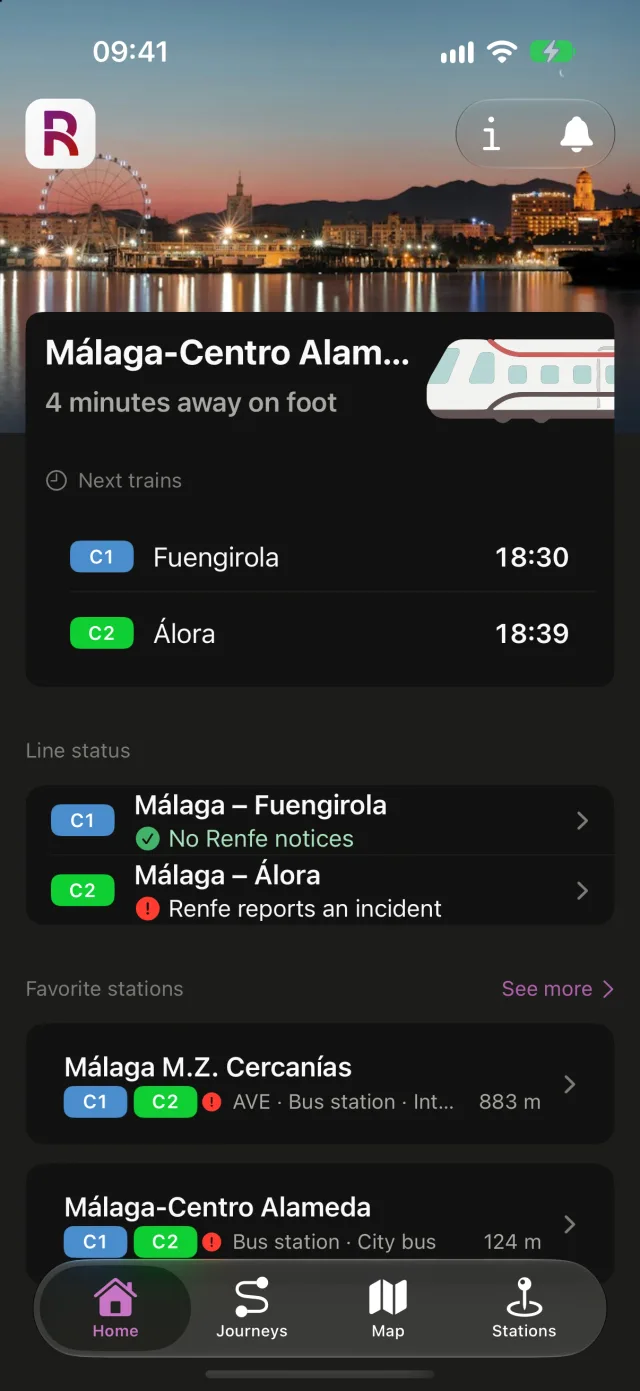
Rail’s Home screen with the next trains from Málaga-Centro Alameda, the status of each line and the list of favorite stations.

Journeys between two stations

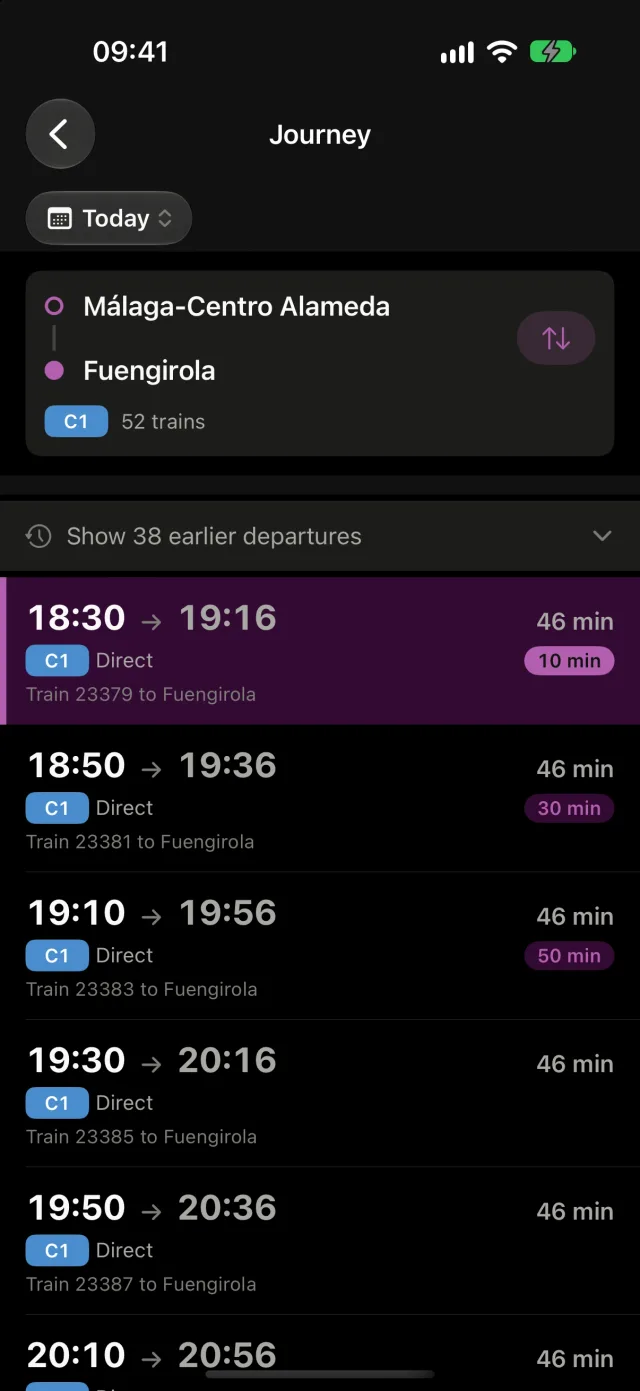
Choose where from, where to and the day. Rail lists every train with its departure time, arrival time and duration, direct or with one transfer.

  • When you need to change trains, it tells you where and how long you’ll wait.
  • Your recent searches stay one tap away.
Journey results in Rail, with departure time, arrival time and duration for each train.

A map with the trains on the move

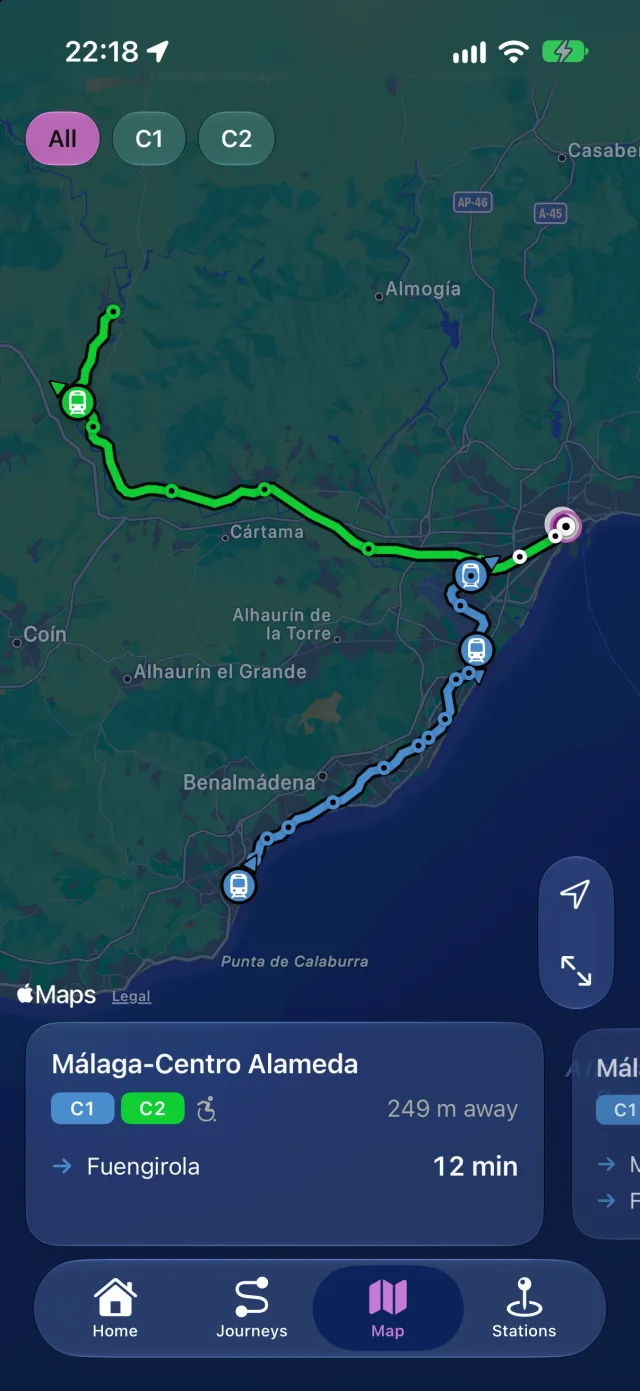
The whole network, the stations near you and every train moving along its line in real time, as long as you’re online.

  • Filter by line to see only the C1 or the C2.
  • Tap a station to see its departures without leaving the map.
Included in Rail Plus
  • Line status on the map: if Renfe reports an incident or trains are running late, you see it next to each line.
Rail’s map with the Cercanías Málaga lines, the trains in service and nearby stations.

A page for every station

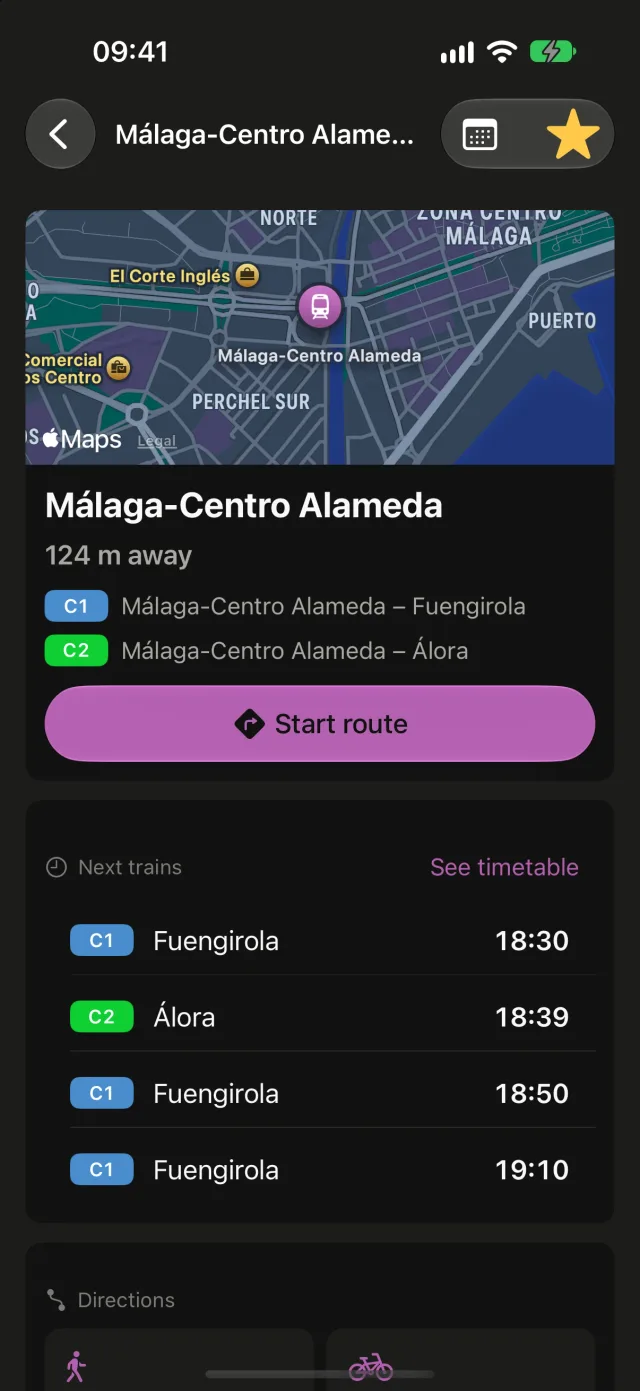
Next departures, the full timetable for the day, accessibility and connections to bus, metro, high-speed rail or the airport.

  • How long it takes to get there on foot, by bike, by car or by public transport.
  • Open the route in Apple Maps with one tap.
A station page in Rail with a map, lines, next trains and a button to start the route.

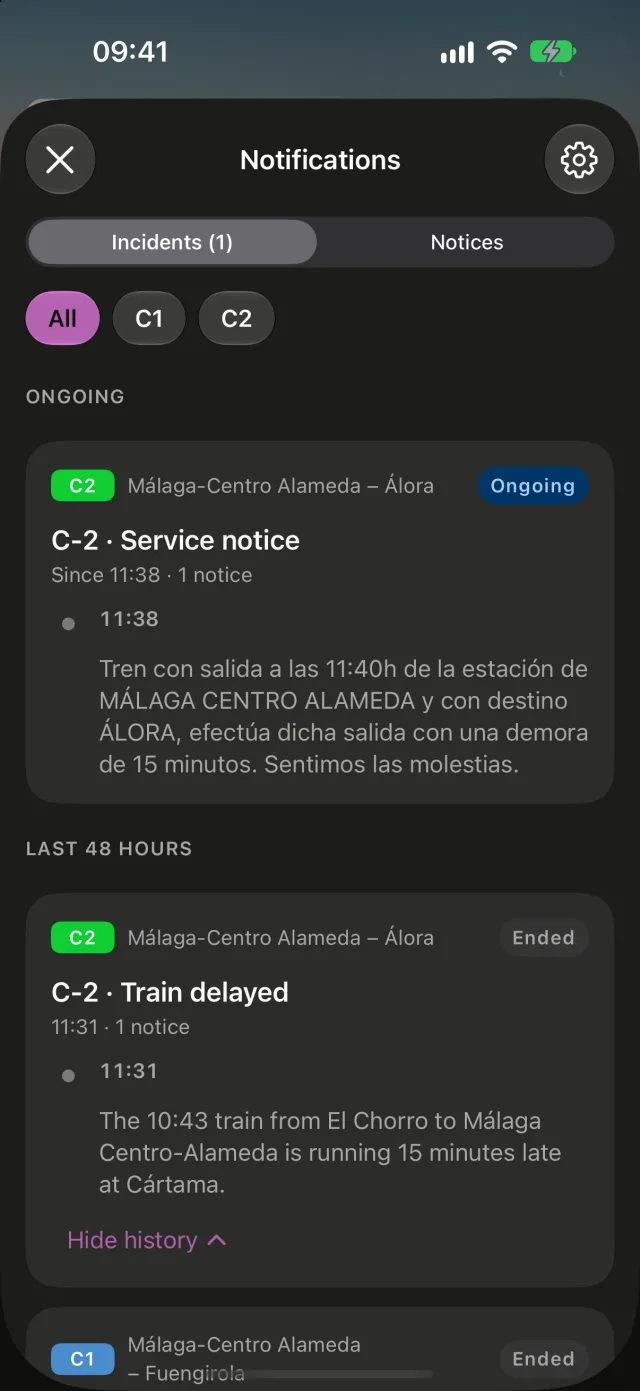
Trouble on the line? You’ll know right away

Delays, cancelled trains, engineering works or broken lifts: what Renfe reports about the network is under the bell on Home, with each incident from the moment it starts until it’s resolved.

  • Renfe only publishes them in Spanish. If your iPhone is set to another language, you can read them translated.
Included in Rail Plus
  • Notifications when Renfe reports incidents on your lines. They make a sound when an incident starts, when it gets worse and when it’s resolved; everything else reaches you silently.
  • Details of Renfe’s notices: the full text, the cause and the alternative route.
Renfe incidents in Rail: one ongoing and those from the last 48 hours, each with its line, its status and its history of notices.
Included in Rail Plus

Your trains, on your Home Screen.

With the Rail widget you see the next departures from the station you choose, and the status of its lines, without opening the app. It comes in three sizes: small, medium and large.

Touch and hold the Home Screen, tap Edit › Add Widget and search for Rail. Then choose the station you want to see.

No signal on the platform, and the timetable is still there.

The first time, Rail downloads the network and the timetables. From then on everything is read from your iPhone: the app opens instantly and works in airplane mode, in a tunnel or when you’ve run out of data.

Every time you open it while online, it checks whether Renfe has published any changes, without keeping you waiting. What does need the internet is anything happening live.

What works in Rail with and without a connection
FeatureOfflineOnline
Timetables and next trainsYesYes
Journeys with a transferYesYes
Stations, accessibility and connectionsYesYes
Favorite stationsYesYes
WidgetRail PlusYesYes
Live trains on the mapNoYes
Renfe incidents and noticesNoYes
NotificationsRail PlusNoYes
Travel times to the stationNoYes

No accounts, no passwords, no tracking.

  • Nothing to set up

    Rail has no sign-up and no login. You open it and it works.

  • Your data stays on your iPhone

    Favorites, recent searches and your usual station are stored on the device. Delete the app and they’re gone.

  • No ads, no analytics

    The app contains no advertising, no trackers and no third-party measurement tools.

Your location is only used while the app is open, to place you on the map and find your station. Notifications are optional and need no account. Read the privacy policy

And a few more details.

Favorite stations
Put them in the order you like and keep them on Home.
Full timetable
Every departure of the day from any station, including the ones that have already left.
Directions
Time to the station on foot, by bike, by car or by public transport.
Accessibility
Which stations are step-free and which have a lift, as reported by Renfe.
Six languages
English, Spanish, German, French, Italian and Portuguese, following your iPhone’s language.
Light and dark mode
It follows the appearance you’ve chosen on your iPhone.
Text at your size
It respects the text size you’ve set in iOS.
iPhone and iPhone Duo
Designed for iPhone and adapted to iPhone Duo, folded or unfolded.

No accounts, no tracking, no surprises.

Download it, pick your station and you’re done: no sign-up and no ads.

Download on the App Store

Frequently asked questions

Can’t find yours? Write to us from support.

Is this Renfe’s official app?

No. Rail is an independent app made by two people who ride the Cercanías. It has no connection with Renfe Operadora, which does not take part in, sponsor or endorse this app.

Which lines and stations does it cover?

Both Cercanías Málaga lines: the C1 (Málaga-Centro Alameda – Fuengirola) and the C2 (Málaga-Centro Alameda – Álora), with their 23 stations. It doesn’t include AVE high-speed or Media Distancia regional trains.

Does it really work without internet?

Yes. The first time you open it, it needs a connection to download the network and the timetables. From then on, next trains, journeys, stations and the widget are read from your iPhone.

Only the live trains on the map, the disruption alerts and notifications, and the estimate of how long it takes you to reach a station need a connection.

Where do the timetables come from? Are they reliable?

From the open datasets Renfe publishes at data.renfe.com. Rail checks for changes every time you open it while online.

Even so, timetables can change or contain errors. If your trip matters, confirm it through Renfe’s official channels.

What does Rail Plus include?

Rail Plus is a one-time in-app purchase: you pay for it once on the App Store, and it isn’t a subscription. It includes:

  • Widget with your next trains.
  • Notifications when Renfe reports incidents on your lines.
  • Cancellations and delays reported by Renfe on each train.
  • Real-time delays of the trains in service.
  • Line status on the map and the widget.
  • Details of Renfe’s notices: the full text, the cause and the alternative route.

Everything else is free: offline timetables, journeys, the map with live trains, station pages, favorites and the notices under the bell on Home. You’ll see the price on the App Store and in the app before you buy.

With Family Sharing, the purchase is shared with your family group. If you switch iPhones or reinstall Rail, get it back with “Restore Purchases” in About.

Does it warn me about delays?

With Rail Plus, yes: turn on notifications and every notice Renfe publishes about the lines you choose, such as delays on the line or cancelled trains, reaches your iPhone. Rail only tells you what Renfe reports. So your phone isn’t going off all the time, it makes a sound when an incident starts, when it gets worse and when it’s resolved; the updates in between reach you silently and stay in Notification Center. In the notification settings you can choose, for each line, to have every notice make a sound.

Rail Plus also marks the trains Renfe reports as delayed or cancelled in the timetables and, if a train is already running, shows its real-time delay, even when Renfe hasn’t reported it. Without Rail Plus, the notices are under the bell on Home, the times in the lists are the scheduled ones and you can see where each train really is on the map.

Notifications are optional and you can turn them off whenever you like.

What does Rail do with my location?

It uses it while the app is open to place you on the map, find your nearest station and tell you how far away it is. It isn’t stored or sent to our servers.

Sharing it is optional: if you’d rather not, you choose your usual station and everything else works the same. The details are in the privacy policy.

How do I add the widget?

The widget is part of Rail Plus. To add it, touch and hold the Home Screen, tap Edit › Add Widget and search for Rail. Choose one of the three sizes and, once it’s in place, touch and hold the widget and tap “Edit Widget” to pick the station.

Which devices does it work on?

iPhone with iOS 26 or later, including iPhone Duo, both folded and unfolded.

Will there be other cities?

For now Rail only covers Cercanías Málaga, the network we use every day. If you’d like to see it in yours, let us know through support.

Carry the timetable in your pocket.

Rail is available on the App Store for iPhone with iOS 26 or later.

Download on the App Store

Scan it with your iPhone’s camera to download Rail.